Identify Steps from Shared Test Cases
This procedure explains how to identify shared test steps within an executed test suite. Shared test steps are displayed with a link icon next to the step number, indicating that the step is referenced from a shared test case.
View Shareable Step details on the Test Execution screen.
The system marks these steps with an icon that opens them in a separate tab.
During test execution, you can mark the entire test case as passed or failed, or update the status of each step individually.
Prerequisites
Access to the required Test Suite.
Permission to execute and view test results.
Identifying Shared Test Cases Steps
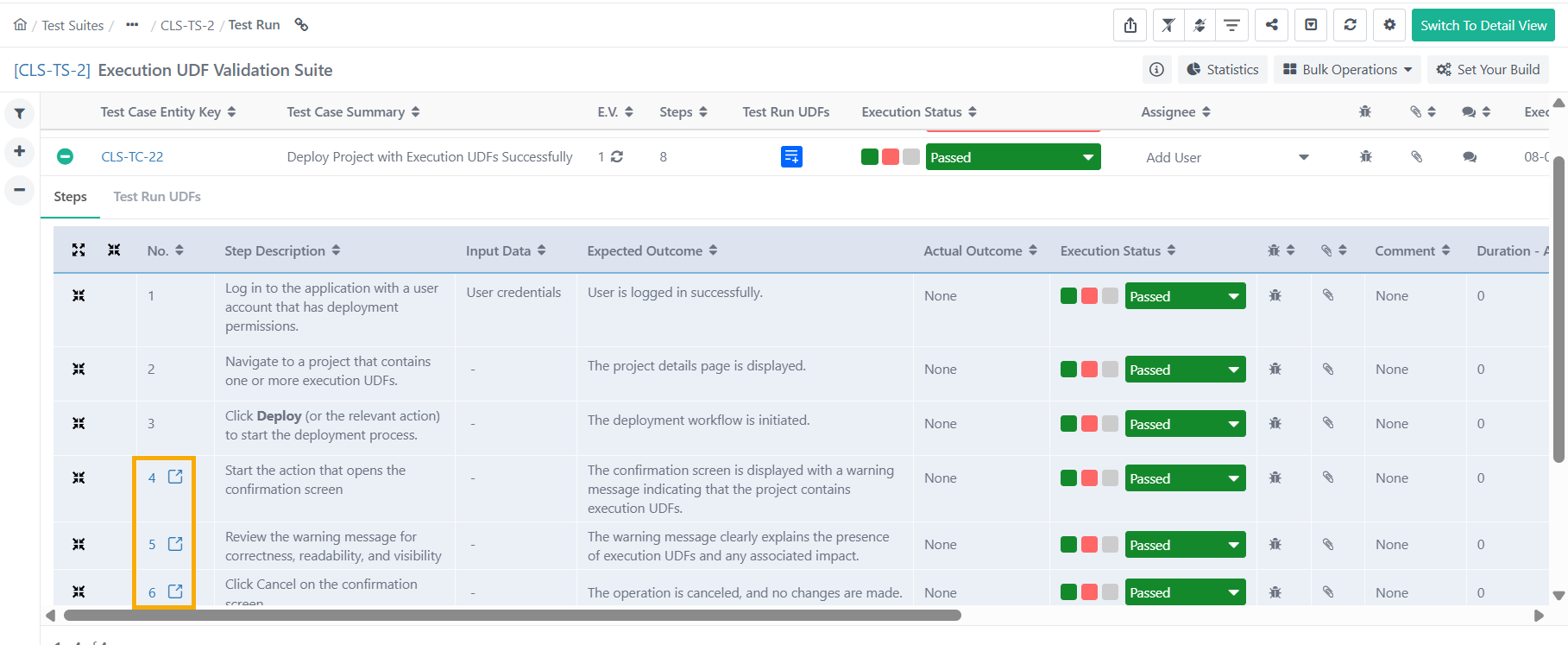
To identify shared test case steps, perform the following steps:
Go to Test Suites module.
Execute a test suite containing test case with shared test steps.
Expand the Steps by clicking the + sign.
Identify the shared test steps by locating the link icon displayed next to the step number.